

Overview
Dynamically update the checkout pricing by adding administrative fees to the final amount based on the selected payment method. With HitPay’s Pass-the-Fees feature, you can now include a surcharge fee in the form of a fixed percentage (%). This feature can be customized for specific payment methods and HitPay sales channels (such as Shopify, WooCommerce, Payment Links, etc.).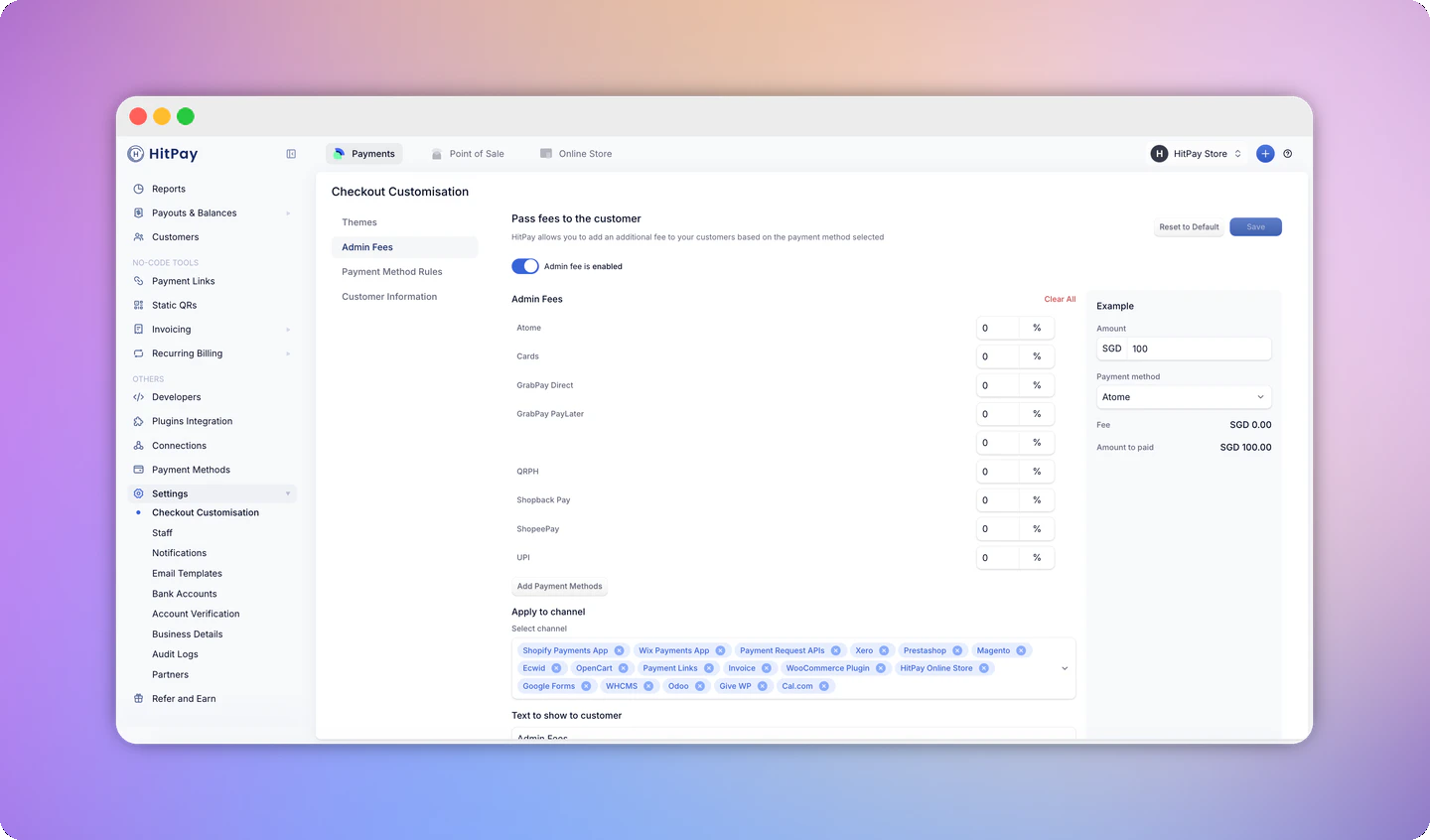
Activate Pass-the-Fees
Pass-the-Fees works for both online payments and HitPay Point of Sale. To add a surcharge from the HitPay POS app at checkout, see POS surcharge.
- Navigate to Settings > Checkout Customization.
- Configure the Pass-the-Fees settings.
- Choose which payment methods you want to apply the payment processing fees to be passed on to the customer.
- Enter the surcharge percentage and select the HitPay sales channel for which you want the Pass-the-Fee function to be applicable.
- Specify the sales channels where you want to apply the Pass-the-Fee feature.
- Enter the text you wish to display to the customer.
- Click “Save.”
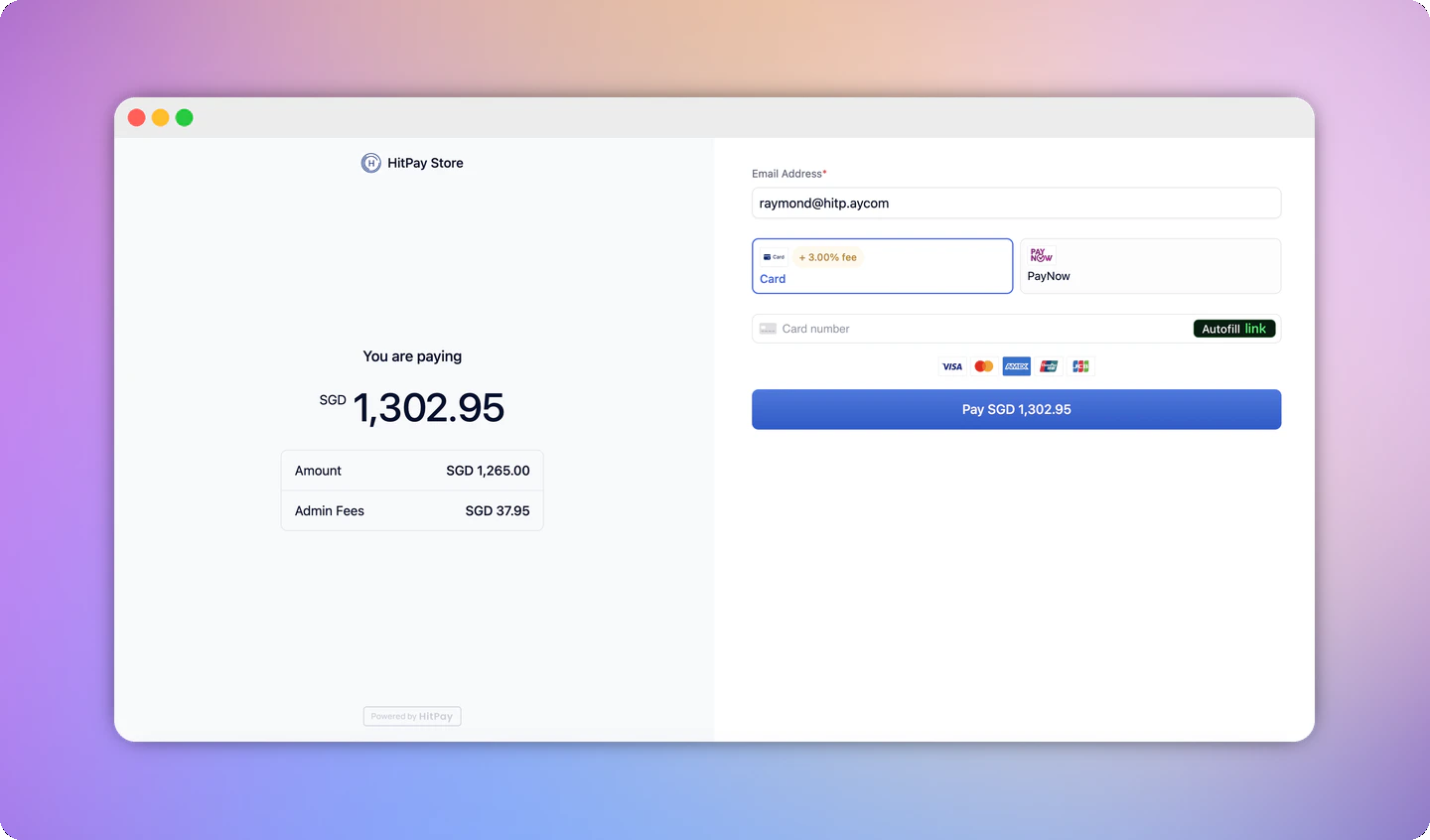
Note on Fees
Note: HitPay transaction fees are applied on the final amount, after the surcharge fee has been added.
- A product is $100
- You’ve set a 5% fees
- The final amount on the payment page will reflect $105
- HitPay transaction fees are then applied on $105 (Not $100) Hence, do set the % accordingly.
Supported Sales Channels
You can apply Pass-the-Fees to any of the following HitPay sales channels:- Payment Links
- Invoice
- Recurring Billing
- HitPay Online Store
- Payment Request APIs
- Point of Sale
- Shopify Payments App
- Wix Payments App
- WooCommerce Plugin
- Prestashop
- Magento
- Ecwid
- OpenCart
- Xero
- Google Forms
- WHCMS
- Odoo
- Give WP
- Cal.com
Restrictions
Foreign Currency Support
Admin Fees now also apply when a customer checks out in a foreign currency via Adaptive Pricing. If both features are enabled, the same admin fee percentage configured for a payment method is applied on top of the converted (foreign currency) amount shown to the customer, rather than only on your base currency amount.The admin fee percentage is set once per payment method and is not configurable separately per currency — the same rate is reused for the converted amount.
- Your base currency is SGD and a product is priced at SGD 100
- You’ve set a 5% admin fee
- A customer checking out in USD sees the converted amount (e.g. USD 74) plus the same 5% admin fee applied on top of that converted amount
- HitPay transaction fees are then applied on the final surcharged amount, same as base-currency checkouts
Admin fees on foreign currency checkouts only apply to fixed-amount payment requests. Payment requests with an editable amount or currency do not show or apply the admin fee.
FAQs
Can I pass the exact fees that HitPay charges to the user?
Can I pass the exact fees that HitPay charges to the user?
No, it is not possible to pass the exact fees that HitPay charges because the fees depend on various factors that are hard to predict before the payment. It is recommended that you set an approximate fee based on your average order value. You can use the example widget to view the approximate values.
Can I add an admin fee to PayNow payments?
Can I add an admin fee to PayNow payments?
No. The Association of Banks in Singapore (ABS) guidelines prohibit merchants from imposing any surcharge or additional fee on PayNow transactions. If you previously enabled an admin fee for PayNow, HitPay has removed it from your checkout. No action is needed from you, and your checkout continues to work as usual without the fee on PayNow.
Are admin fees available for businesses in the Philippines?
Are admin fees available for businesses in the Philippines?
No. To comply with the Department of Trade and Industry (DTI) Department Administrative Order (DAO) No. 21-03 and DAO No. 10, Series of 2006, HitPay removed the Admin Fee feature for businesses in the Philippines on 14 July 2026. Admin fees are no longer applied to transactions, and customers are charged only the purchase amount. No action is needed from you.
Does the admin fee apply when a customer pays in a foreign currency?
Does the admin fee apply when a customer pays in a foreign currency?
Yes, if you have Adaptive Pricing enabled. The same admin fee percentage you’ve configured for a payment method is applied to the converted foreign currency amount shown at checkout.